Built by production teams, for production teams

Backstage to FOH.
Always on the same clock.

Realtime stage timing for festivals, conferences, broadcast and church productions. One schedule shared across every screen, every operator, every device - no radios screaming, no spreadsheets, no surprises.

From €12,95/mo No install Cancel monthly Or one-off event pass
Backstage · Main stage
23:14:08
Live now
Joris Voorn b2b Nic Fanciulli
23:00 - 00:30 · Booth A
Remaining
03:42
Next up
00:30 Mahmut Orhan
7+ stages
in sync simultaneously
150+ acts
programmed per edition
Multi-day
one shared schedule
Live in 5 min
no install or onboarding
What it is

Stagetimer is the timing nerve centre for your show day. One schedule, every screen, always in sync.

01
No "users", "viewers" or "seats"
You pay per live stage. One stage already includes the backstage monitor, FOH desk, artist lounge display, stage manager laptop, iPad views and any LED output you throw at it.
02
Built by people who run shows
Designed by production crew who get nervous when a timer drifts. Every screen, button and shortcut is tuned to how the floor actually works during a live event.
03
Browser, not an app store
Stagetimer runs in any modern browser. Your crew opens a link, that's it. No installs, no accounts to provision, no App Store gates between you and a working backstage display.
Built for the floor

Everything a production needs.
Nothing it doesn't.

Realtime timer logic, a screen for every role, and the controls a floor manager actually reaches for during the set.

Realtime countdown

Every screen ticks in lockstep.

A single source of truth syncs over WebSocket. Edit the lineup on the operator laptop, the backstage iPad updates within 250 milliseconds. No refreshes, no stale data, no "wait, who's on next?".

Live · Main stage 23:14:08
Remaining
Charlotte de Witte
03:42
Multi-stage

3, 7, or 20 stages at once.

One overview, all your stages live.

Main stage● Live
Tent 02Next 00:30
Bass arenaNext 00:45
Sun stageEnded
DJ booth swap

A and B booth labels.

Tell the crew exactly which booth to set up next - colour-coded on every screen.

Booth
A
Booth
B
Floor cues

Tap a button. The speaker sees it.

Flash messages onto the stage view from the FOH desk - perfect for broadcast and keynote stages.

Ready
5 min
Wrap up
Multi-day

Whole-weekend planning.

A project can hold every day of your festival. The timer only fires on the actual show day.

Thu Fri Sat Sun

And the basics done right.

JSON lineup import · share links without accounts · live + manual triggers · per-show notes · custom branding · web app on any device.

PWA Realtime No login
Live operator toolkit

Controls the floor manager actually reaches for.

The buttons that matter when the artist runs long, the keynote stretches, or the network blips - all one tap away.

Floor cues

Flash a message to the speaker.

Tap a colour-coded preset (READY / 5 MIN / WRAP UP) or send a custom message. Appears as a full-bleed banner on the Stage View, auto-clears after 8 seconds.

READY 5 MIN WRAP UP STAND BY
Broadcast rundown

LIVE · VTR · GFX · BREAK.

Tag each item in the rundown with a broadcast category. Colour-coded badges so the gallery director scans the schedule by type, not by guest name.

LIVE VTR OOV GFX INT BREAK
Smart ripple

+5 min on the live show.

Artist running long? Tap +5. The next slot absorbs the change - its start moves but its end stays locked. The rest of the schedule isn't touched.

-5
-1
+1
+5
Stage View modes

Countdown, clock, count-up or blank.

Pick what each Stage View shows. Per stage, independently. Put one screen on the wall clock while another keeps counting.

Countdown
Clock
Count up
Blank
Kill switch

Blackout, instantly.

One button. Every viewer screen goes black until you flip it back. For breaks, emergencies, surprise reveals - the operator dashboard stays live so you keep driving.

BLACKOUT
● Blackout
Hidden items

Hide items from public links.

Mark soundcheck, build-up or crew briefings as hidden. They stay in the operator schedule but disappear from every public share-link the audience or talent sees.

22:00 · Soundcheck Stage A HIDDEN
FOH share link

One link per role, per stage.

Every stage gets three public read-only URLs: Stage View, Backstage and FOH. Send them, the crew opens in any browser - no account, no install, just a working clock.

Stage…&mode=stage&sid=…
Backstage…&mode=backstage&sid=…
FOH…&mode=foh&sid=…
DJ booth swap

A and B labels everywhere.

Tag every act with the booth they perform from. Colour-coded on every screen so the crew knows which side of the stage to ready next.

BOOTH A BOOTH B
iPad fullscreen

Installs as a native-feeling app.

Add to home screen on iOS or Android and Stagetimer launches edge-to-edge with no browser chrome. Wake-lock keeps the backstage iPad awake all night.

PWA WAKE LOCK FULLSCREEN
A screen for every role

Five views.
One source of truth.

Each role on the production floor gets exactly the information they need - no more, no less.
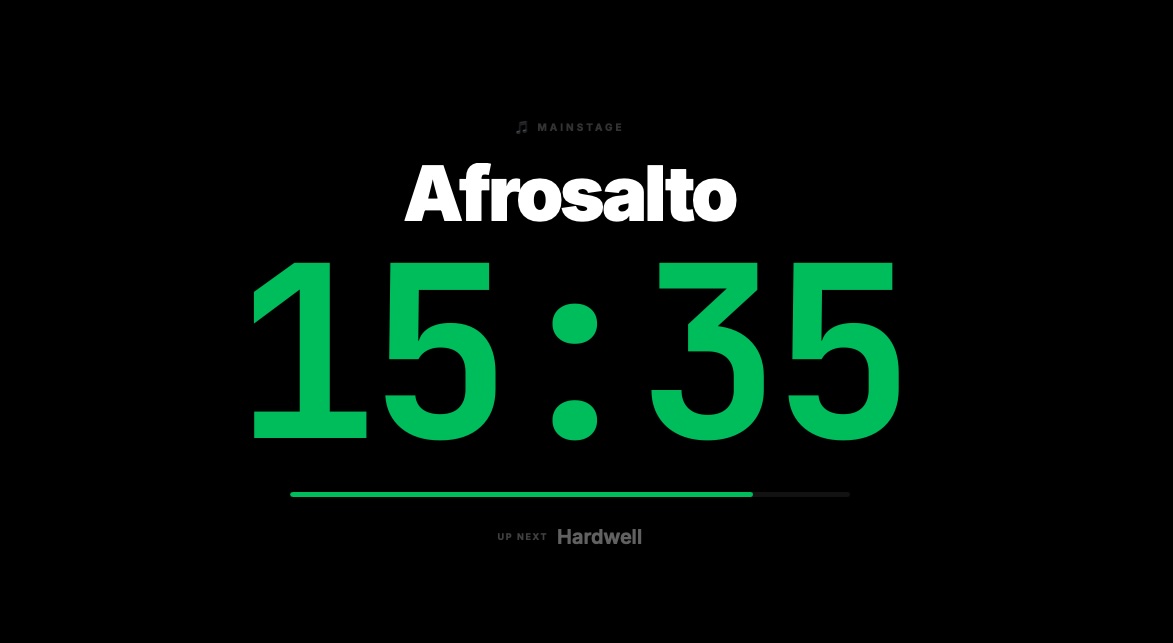
Stage display
Stage view
The artist's clock
Fullscreen countdown for the stage monitor. Artist, time remaining, next-up - readable from front-of-house.
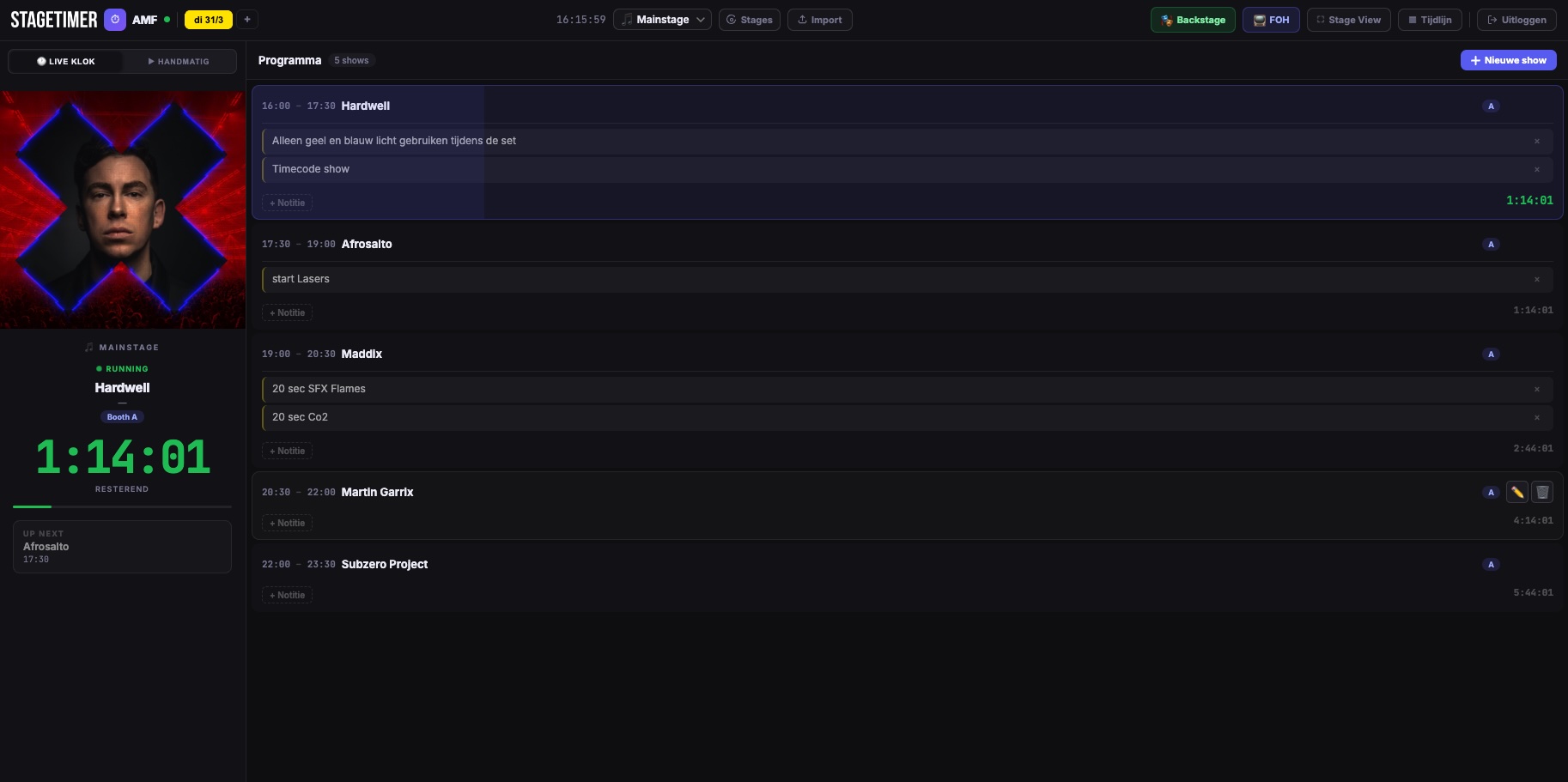
FOH view
FOH
Mix-position dashboard
Full production view at the mix desk. Notes, per-show countdown, live status of every act on your stage.
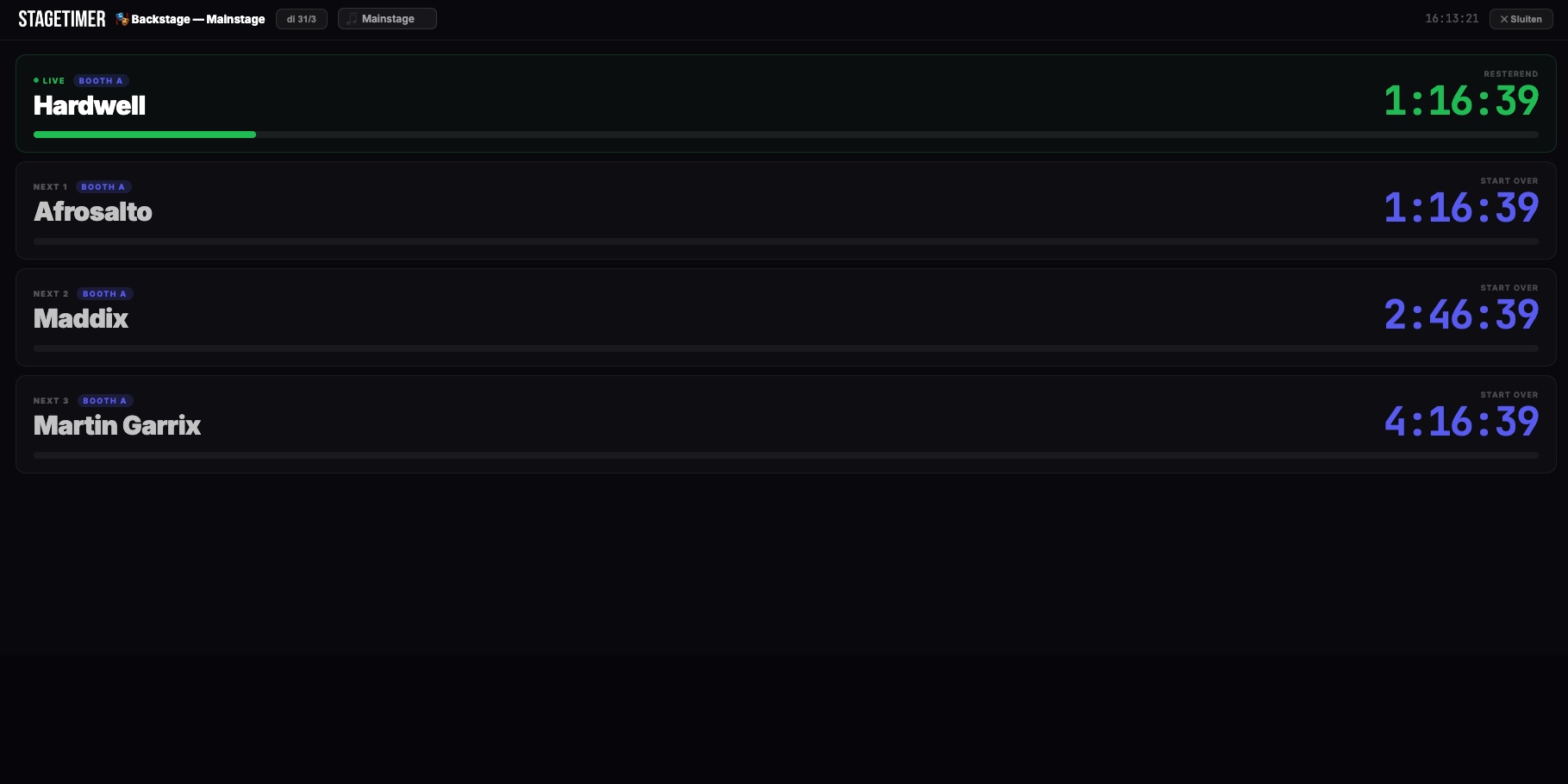
Backstage view
Backstage
Live overview for crew
Shareable link that opens instantly on any phone. No account needed for the crew, no app to install.
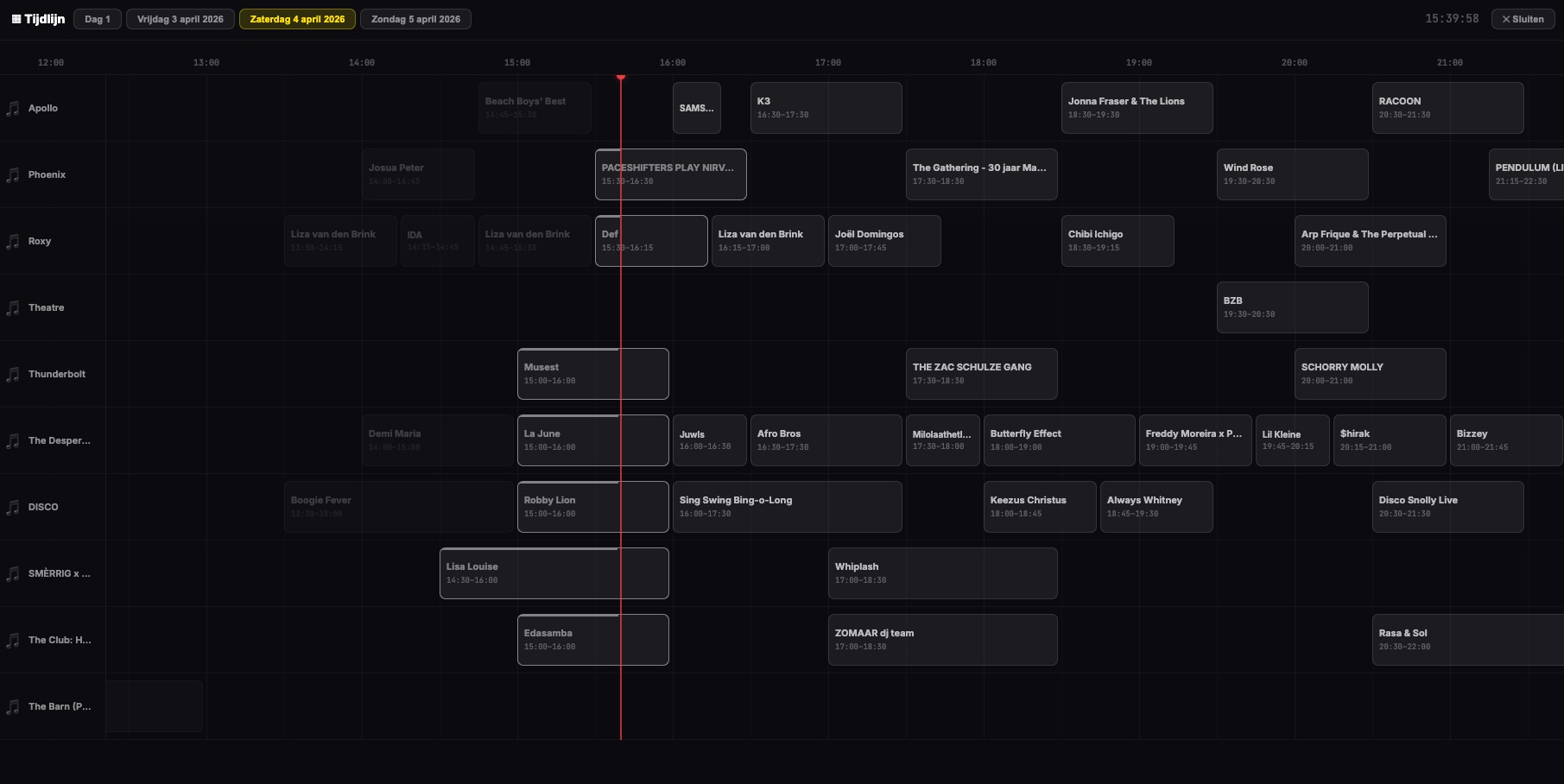
Timeline
Timeline
Gantt-style day overview
All stages side by side on a timeline. Spot overlaps instantly, see when a stage is empty or packed.
Overview
Overview
Stage-by-stage at a glance
Multi-stage card grid for the production office and lobby displays - what's live on every stage, right now.
How it works

From signup to live on stage in four steps.

You can have your whole crew on the same schedule before lunch.

01 · Create
Set up the project
Name the event, add the stages or rooms, define your show days. Two minutes.
02 · Lineup
Drop in the schedule
Add acts manually or import the whole rundown as JSON. Notes per show, booth labels, the lot.
03 · Share
Send the links
Every stage gets its own backstage + stage view link. Crew opens in any browser, no account.
04 · Go live
Hit the stage
Turn on the stage display. The timer runs automatically or on your cue, and advances to the next act.
Not just festivals

Wherever timing matters.

If a clock can decide whether a show lands well or badly, Stagetimer earns its keep.

Conferences
Confidence monitor for keynote speakers
Send floor cues like "wrap up" or "Q&A starts now" that only the speaker sees. Audience never notices, talks land on time, sessions don't blow up the day's schedule.
Church productions
Direction for services
Worship, sermon and announcements all on one shared timer. Director sends cues to the platform while the countdown runs - calm and clear for everyone behind the desk.
Livestreams & broadcast
Always know how long you have left
Open the timer in a browser on a second screen or tablet next to your camera. No software install, no compatibility surprises - just a clock that's always right.
Pricing

How many stages will run at the same time?

You pay per live stage - not per viewer, operator or shared link. Unlimited projects, templates and team members included on every plan.

● 1 live stage
Freelancer
129,50
per year · excl. VAT
For solo operators and small productions.
  • 1 live stage
  • Unlimited viewers
  • Unlimited shared links
  • Unlimited projects / templates
  • Fullscreen mode & mobile support
● Unlimited live stages
Festival
399,50
per year · excl. VAT
For full-scale festivals and multi-stage productions.
  • Unlimited live stages
  • Unlimited viewers & displays
  • Priority support
  • Premium infrastructure
  • Everything in Team

Just running one event?

Skip the subscription. Pay once for the exact duration you need - unlimited stages and viewers, expires automatically. Nothing to cancel.

Single Event
3 days
79
One festival day with setup & takedown. Activates instantly, full access for 3 days, then expires.
Weekend Festival
14 days
149
Weekend festivals with build-up & breakdown. Two weeks of unlimited stages and viewers.
Monthly Festival
30 days
249
Month-long festivals, summer tours or seasonal productions. 30 days from the moment you buy.
How event passes work

One-time payment. Your pass activates the moment payment goes through and includes unlimited live stages, viewers and shared links for the duration. When the pass ends, access stops automatically - no subscription to cancel, no email reminders, nothing to manage. Need another event? Buy a new pass.

Mobile

Always within reach.

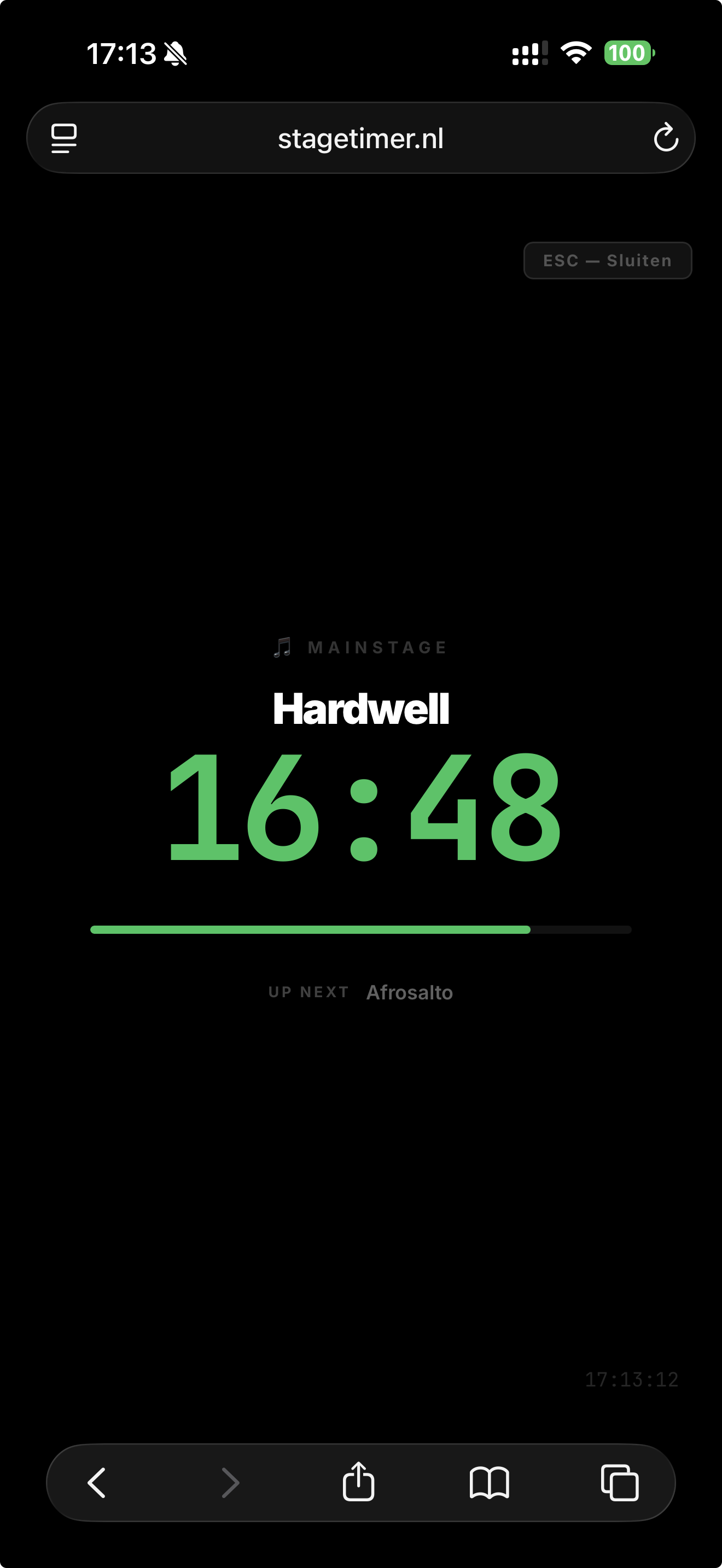
Fully responsive. Open Stagetimer in any browser on iPhone, Android, tablet or laptop. No app store, no install.
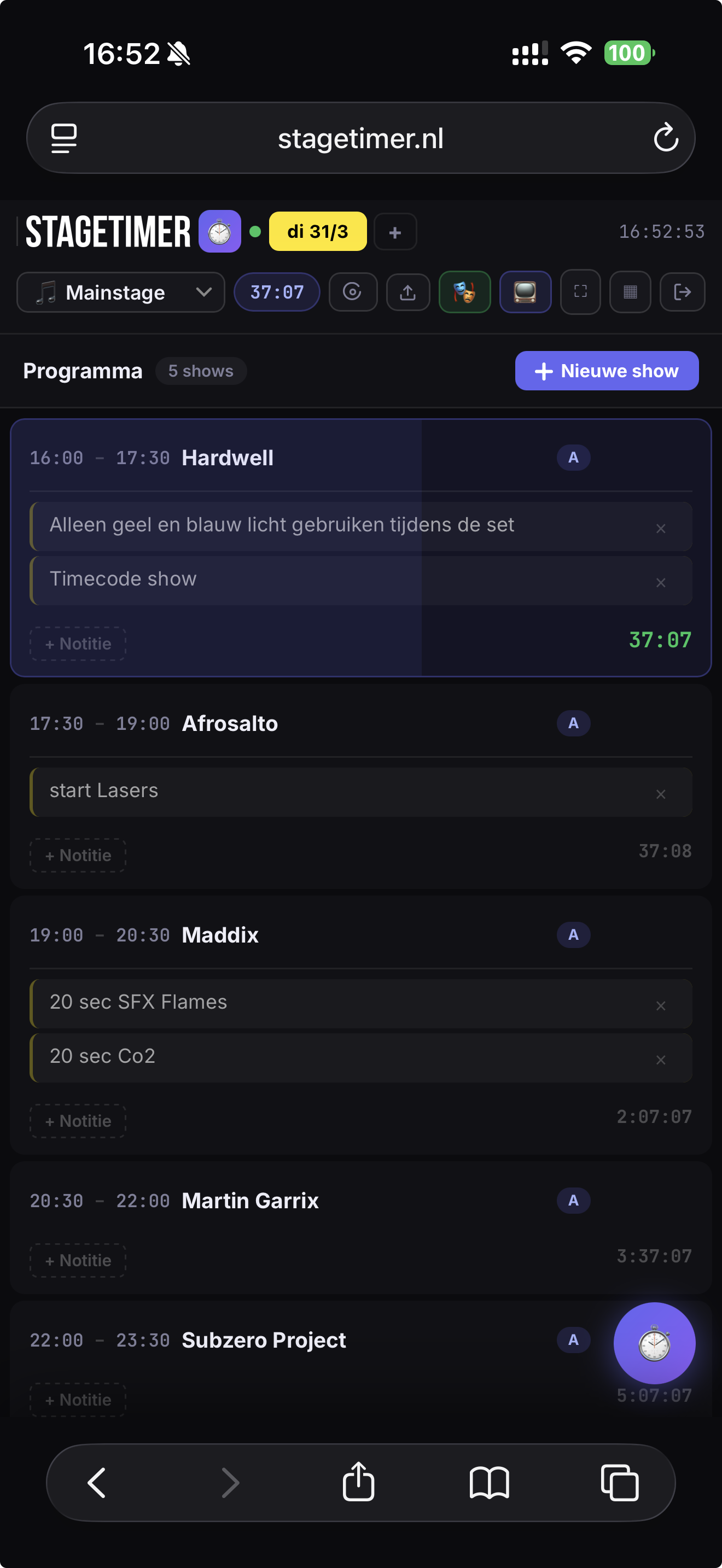
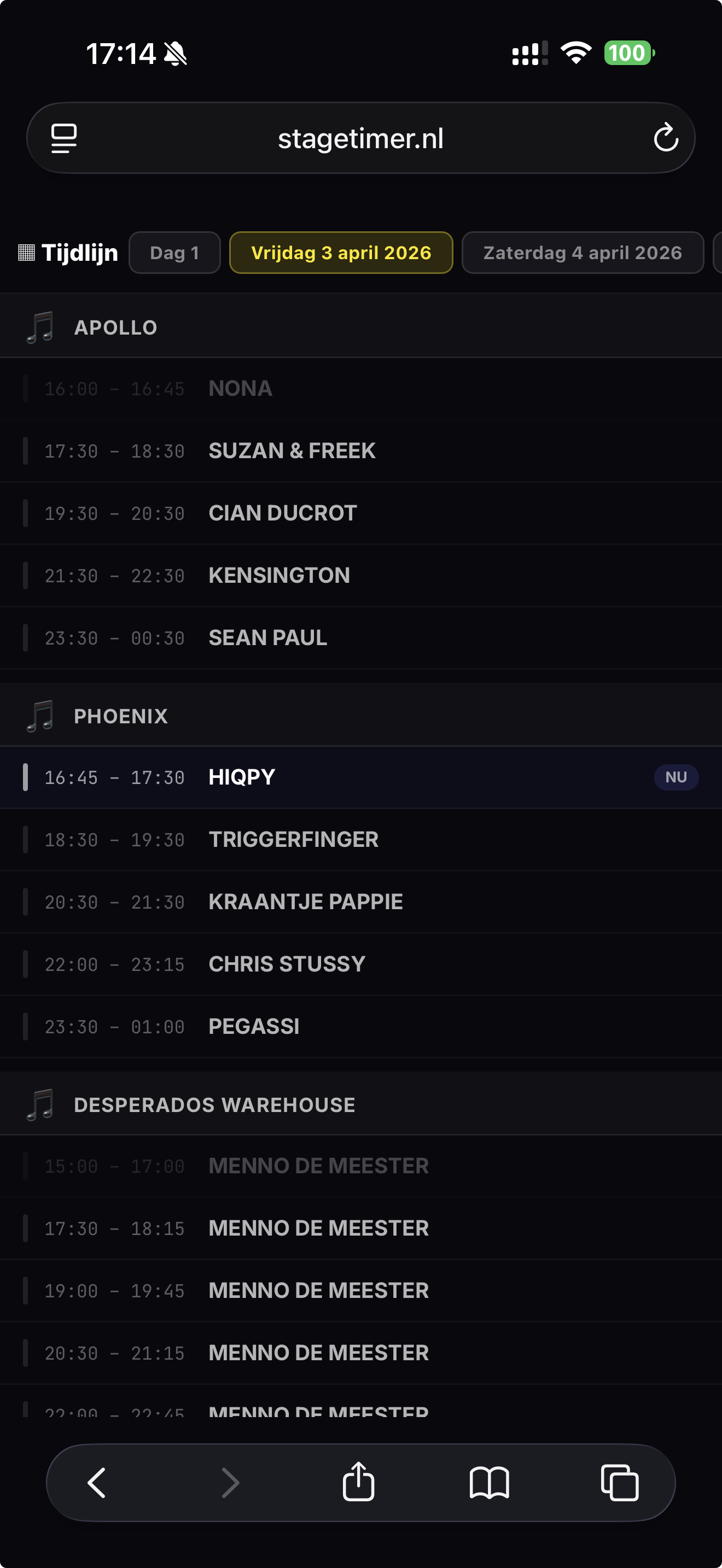
Programme overview
Stage countdown
Timeline
Works in any browser No app, no install Crew needs no account
Open the app
Frequently asked

Good to know.

The questions we hear most often - and the honest answers.

Does my crew need their own account?
No. You create projects and share a read-only link per stage or view. Anyone with the link sees what's happening in realtime - no login, no app store, no hassle.
Is there a free trial?
No separate trial. Pick the plan that matches the number of stages you actually run - Freelancer (1 stage) from €12,95, Team (3 stages), or Festival (unlimited). Running a one-off event? Buy an event pass instead and skip the subscription entirely. Cancel any subscription in one click via Stripe.
Does it work on a backstage crew iPad?
Yes. Stagetimer runs in any modern browser - iOS Safari, Android Chrome, desktop, anything. The backstage and stage views are specifically designed to live permanently on a tablet or monitor.
Can I manage multiple festivals at once?
Yes. Unlimited projects on every plan. A project can contain multiple stages and multiple days, so anything from a one-day conference to a three-day festival with 10+ stages runs on the same subscription.
What happens to my data if I cancel?
You keep access until the end of your last paid period. After that, we set the account to read-only for 30 days so you can export your data. We then delete the project data from our database.
Does it work without internet?
Stagetimer is realtime and syncs over the internet. The last state stays cached in the browser to bridge brief hiccups, but for live work we recommend a stable connection (4G or WiFi) on every device.
Can the operator send messages to the speaker mid-show?
Yes. The floor cue panel sends colour-coded messages (READY, 5 MIN, WRAP UP, STAND BY, GO TO BREAK or any custom text) to the Stage View. The message flashes as a full-bleed banner and auto-clears after 8 seconds. Per-stage scoped, so a cue for one stage never lights up another.
Does it support broadcast rundowns (LIVE / VTR / OOV / GFX / INT / BREAK)?
Yes. Each item in the schedule can carry a broadcast type tag. The badges are colour-coded on every list - Backstage, FOH, schedule, timeline - so a gallery director can scan the rundown by type rather than reading guest names.
Can I extend the live show on the fly?
Tap +5, +1, -1 or -5 min while the show is running. The next slot absorbs the change - its start moves with the live end while its end stays fixed - so only that one slot gets shorter or longer. The rest of the schedule isn't touched.
What if I need to black out the screens during a break?
One Blackout button in the operator dashboard. Every public viewer screen (Stage View, Backstage, FOH) goes black until you flip it off. The operator dashboard stays live so you can keep driving the schedule behind the curtain.

Your next event.
Perfectly timed.

Live with your whole production in under five minutes.

Create your account

Get started right after your first payment.

Stagetimer Freelancer
1 live stage · unlimited viewers
€12,95
per month

Secure payment via Stripe. After checkout you set your password.